
How to book meetings on LinkedIn: from connection request to calendar invite
Forty people accepted your connection request this month. You sent each of them a pitch. Two replied, and neither booked a call.
This guide shows how to book meetings on LinkedIn without burning your network: who to invite, what to write at each step, when to ask for the call, and how to move the conversation into a calendar. It includes LinkedIn’s current limits, checked on LinkedIn’s own help pages in October 2026, and a template for every message.
KEY TAKEAWAYS
- Earn each step: profile, connect, converse, ask, calendar. Move up only when the prospect does.
- Invites are scarce. LinkedIn caps weekly invitations without publishing the number.
- A note trades a few accepts for replies: 25.3% vs 27.6% accepted, 8.2% vs 5.3% replied (Belkins, 2026).
- Ask after a signal, then take their email and send the calendar invite yourself.
- Automation breaks LinkedIn’s User Agreement. Keep volumes to what a person could do by hand.
How to book meetings on LinkedIn: the 5-step ladder
Booking meetings on LinkedIn means moving a prospect up a short ladder: a profile that says who you help, a connection request with no pitch, a conversation about their problem, a small ask for a call, and a calendar invite you send yourself. Each step has to earn the next, so you only move up when the prospect does.
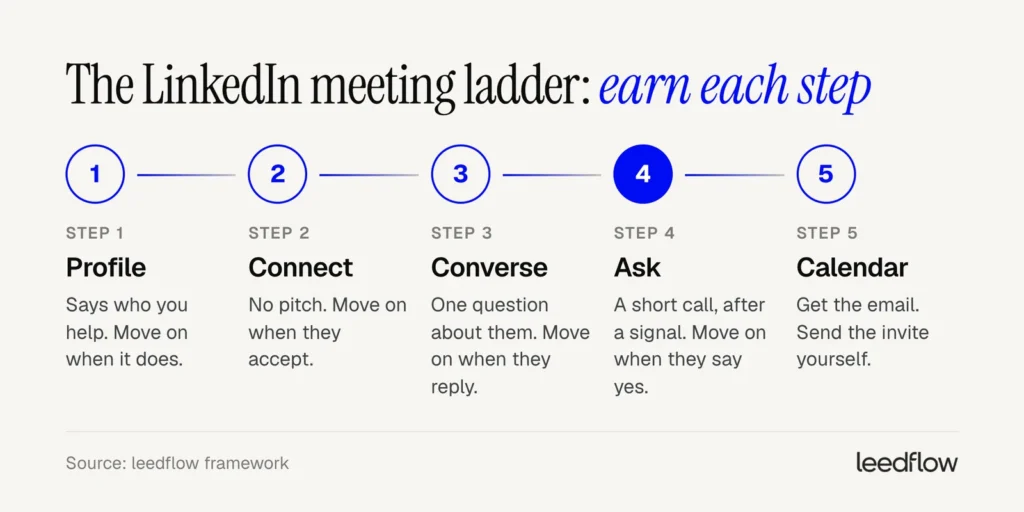
Most LinkedIn outreach jumps from step 2 to step 4. The invite gets accepted, and the next message asks for half an hour.
LinkedIn users call it the pitch slap, and most ignore it.
The ladder is slower per person. It’s also the version that works when you can only invite a limited number of people each week, which is the situation every LinkedIn seller is in.
What are LinkedIn’s limits in 2026?
About 100 a week. That’s what outreach tools plan around for LinkedIn invitations (Expandi, 2026). LinkedIn doesn’t publish the number. It only confirms that limits exist, that sending many invitations in a short time can get you restricted, and that most restrictions lift within a week (LinkedIn Help, 2026).
| Limit | What LinkedIn says | Note |
|---|---|---|
| Invitations per week | Not published | Tools plan around 100, from observation. It varies by account |
| Notes on invitations, free account | Up to 3 a month, 200 characters (help page) | An older LinkedIn page says up to 5, with no time period (help page). Plan for 3 |
| Notes on invitations, Premium | Unlimited, 300 characters | From the second help page |
| InMail credits per month | Premium Career 5, Premium Business 15, Sales Navigator 50 | Credit back if they respond within 90 days (help page) |
| Sales Navigator InMail length | Subject 200 characters, body 2,000 (help page) | Shorter gets read |
| Re-inviting after you withdraw | Wait up to 3 weeks | Too many pending invites can mean waiting up to a month |
| Connections | 30,000 maximum | Rarely the problem |
So invites are your scarcest resource. At around 100 a week and Expandi’s 28.5% average acceptance rate, you gain about 28 new connections a week.
On a free account, most of those invites go out without a note. Your profile has to explain why you’re worth accepting.
Is LinkedIn automation allowed?
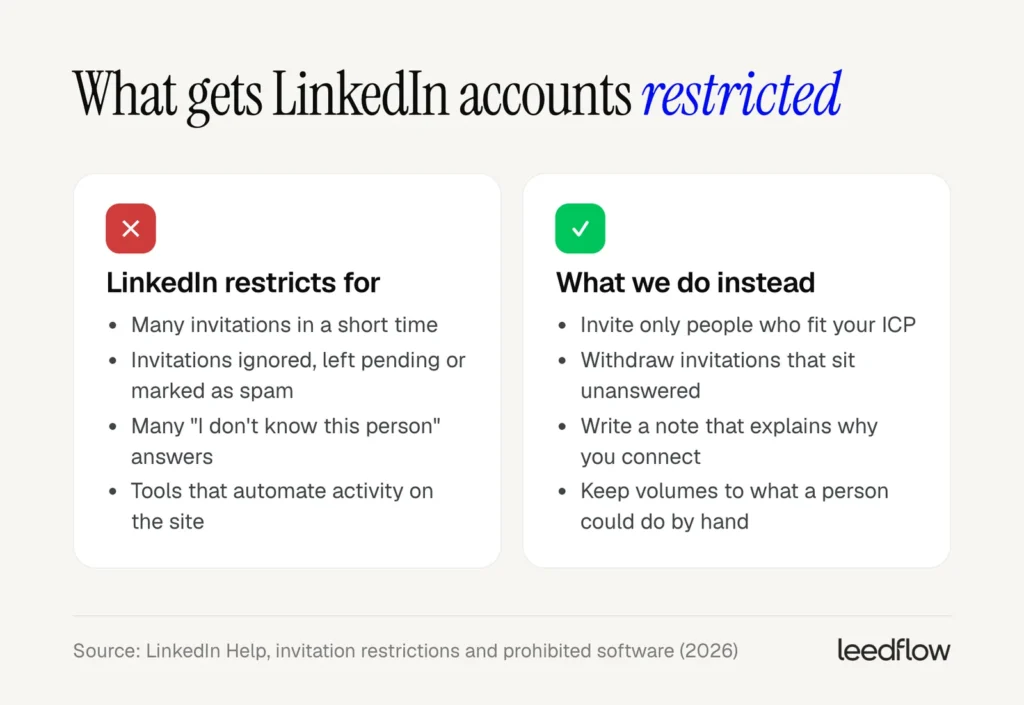
No. LinkedIn prohibits software, scripts and browser extensions that automate activity on the site, including adding contacts and sending messages. Members who use them “risk having their accounts restricted or shut down” (LinkedIn Help).
That covers most LinkedIn automation tools, leedflow’s LinkedIn steps included. If you automate anyway, do it knowingly. Keep volumes at what a person could do by hand. Write every message for a real segment.
And stop at the first warning.
Who should you connect with on LinkedIn?
28.5%. That’s the average acceptance rate across 13.2 million connection requests in Expandi’s 2026 benchmark, sent from 13,302 accounts between May 2025 and April 2026. The sender’s seniority barely moved it: every group landed within three points.
So the lever is targeting: who gets your invites, and why now.
Look for a reason to connect now. Sales Navigator has a filter for most of them (LinkedIn Help):
| Filter | What it tells you | How to use it |
|---|---|---|
| Changed jobs (last 90 days) | New role, new priorities | Ask about their first priorities |
| Posted on LinkedIn (last 30 days) | They’re active and will see you | Comment on the post before you invite |
| Viewed your profile recently | They already know your name | Invite with a note on the shared topic |
| Shared experiences | Same group, school or employer | Open with it |
| TeamLink | A colleague is connected to them | Ask your colleague for an intro |
| Following your company | They know who you are | Ask what made them follow |
Warm up before the invite. Expandi recommends a profile view and some engagement with their content first, so they recognise your name when the request arrives.
A real comment beats a like. Add a point of view or a question.
Sales Navigator finds people, but it doesn’t give you their email. Build the same list in a B2B lead generation platform like leedflow, with 60+ filters across 400M+ contacts and real-time email verification, and the people who never accept still have a second route.
Fix your profile before the first invite
Your invite lands. The first thing they do is click your name.
- Headline: who you help, with what. “Account Executive at [Company]” tells them nothing.
- About: the problem you solve, in their words, plus one proof point.
- Featured: one useful resource, such as a checklist or a short guide.
- Activity: a few recent posts or comments on the topic you’ll message about.
- Booking button: LinkedIn offers a custom “Book an appointment” button to a select group of Premium Business, Sales Navigator and Recruiter Lite subscribers. It shows on your profile, in search results and in messages.
What should your LinkedIn connection request say?
25.3% versus 27.6%. In Belkins’ 2026 LinkedIn study, requests with a personalized note were accepted slightly less often than blank ones. They got more replies, though: 8.2% against 5.3%.
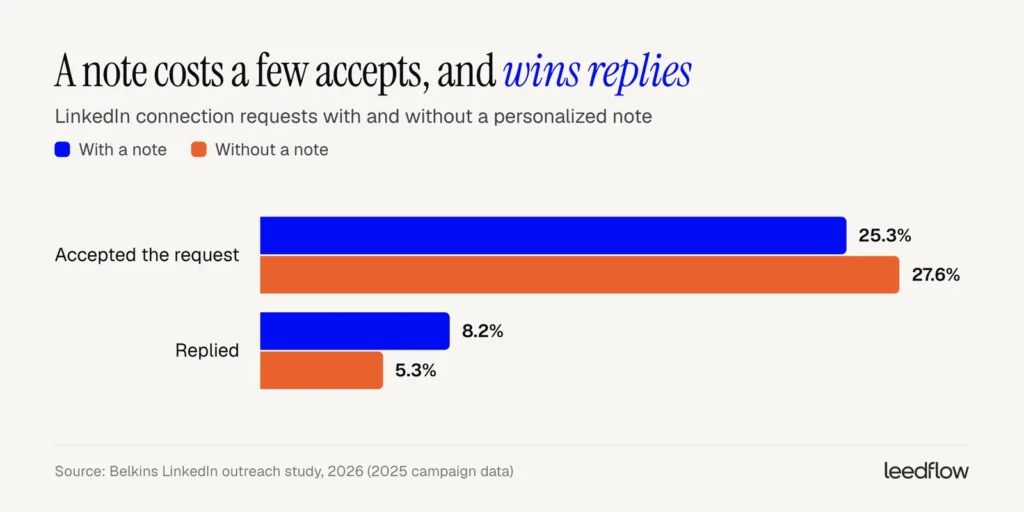
One caveat. Belkins is an agency analysing its own campaigns and Expandi platform data, so these are not controlled tests.
Notes are losing power as a pitch. Expandi saw replies to the note itself fall from 3.5% to 2.2% between May 2025 and April 2026. Use the note to explain why you’re connecting, and keep the selling for later.
Free accounts get only a few notes a month. Spend them on your best-fit prospects and send the rest blank.
Note after a job change
Hi [First name], saw you’ve just started as [role] at [Company].
I work with [role]s at [type of company] in [region] and would like to follow how you approach [topic].
Note after engaging with their post
Hi [First name], your post on [topic] made me rethink [specific point].
I write about [related topic] for [audience]. Happy to connect.
Note with shared context
Hi [First name], we’re both in [group / were both at Company].
I work with [audience] on [problem area]. Would be good to connect.
What should you send after someone accepts?
They accept on a Tuesday. A minute later an automated message arrives: three paragraphs, a calendar link and “worth a quick chat?” Most people never answer it.
The messages you send matter more than the note. In Expandi’s data, outbound messages (welcome messages, follow-ups, InMails and emails) got a 10.4% reply rate. Connection notes got 3.0%.
What we put in the first message:
- Thanks, then one line on why you connected.
- One question about their situation that they can answer in a sentence.
- No link, no attachment and no request for time.
First message after they accept
Thanks for connecting, [First name].
I reached out because [trigger or shared topic].
Curious: how is [Company] handling [problem area] right now? [Option A], or more [option B]?
No reply after a few days? Send something useful instead of a reminder.
Value message
[First name], one thing that might be useful: [resource, insight or short observation about their company].
No need to reply. If [problem] is on your list this quarter, happy to compare notes.
When should you ask for the meeting?
“We’re hiring SDRs and our list is a mess.” That’s a prospect describing a problem. It’s also your opening.
Ask when you see one of these signals:
- They describe a problem you solve, in their own words.
- They ask how you or others handle it.
- They engage twice, for example a reply plus a comment on your post, or a profile view after your message.
No signal after two messages? Don’t ask yet. Switch channel, or wait for a better reason.
When you ask, keep it small and specific. We suggest a 20-minute call with a one-line purpose, and two concrete times so they can say yes in one word.
The meeting ask
That’s a common one for [teams like theirs]. Worth a short call to compare how [similar companies] handle it? I can show you [one specific thing].
Does [day] at [time] or [day] at [time] work?
How to move from LinkedIn to the calendar
They say yes in the chat. This is where many LinkedIn meetings die: the rep sends a booking link and waits.
- Confirm the time in the same thread.
- Ask for their email for the invite.
- Send the calendar invite yourself within the hour, with their problem in the title and a short agenda.
- Confirm in LinkedIn that the invite is on its way.
- Use a booking link only as a backup when your times don’t fit.
The handoff
Great. What’s the best email for the invite? I’ll send it for [day] at [time] with a short agenda.
From here, reminders and no-shows work the same as for any sales meeting.
How do you follow up on LinkedIn?
Half. In connection-request campaigns on Expandi’s platform, reported in Belkins’ study, replies split evenly: 4.0% on the first message, 4.0% on the follow-ups. When the prospects were already connections, the first message did more of the work (8.7% vs 3.5%).
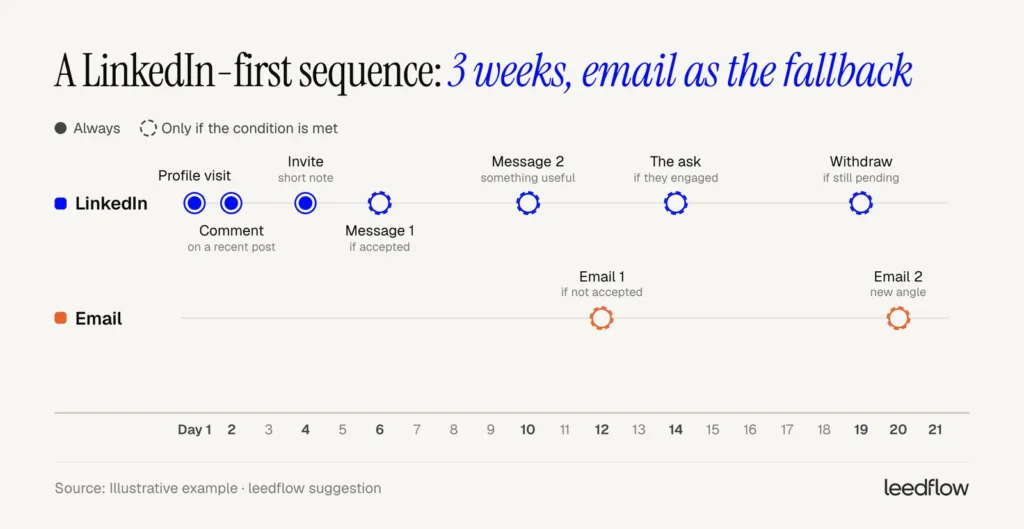
Most LinkedIn follow-up is either missing or relentless. What we do:
- Two follow-ups at most after the first message, each with a new angle.
- Three to five days between them.
- Withdraw invites that sit unanswered for two to three weeks. LinkedIn counts ignored and pending invites against you, and you can’t re-invite the same person for up to three weeks.
- Stop everywhere on any reply, including “not now”.
When LinkedIn stalls, change the route:
| If… | Use | Why |
|---|---|---|
| They accepted | LinkedIn message | Free, and they chose to connect |
| No accept, but you have a verified email | Costs no invite and no credit | |
| They’re Premium with Open Profile on | Open Profile message | Free to send, even without a connection |
| No email, and the account is worth it | InMail | Paid, but the credit comes back when they respond |
| A colleague knows them | An intro via TeamLink | The warmest route there is |
Follow-up with a new angle
[First name], a different angle on [topic]: [one observation about what teams like theirs changed].
Does that match what you see at [Company]?
How should you reply to “not now” and other answers?
“Not right now.” On email, that usually ends the thread. On LinkedIn you stay connected, so you can keep showing up without another pitch.
| They say | What to send |
|---|---|
| “Not now” | Thanks, a question about what would change it, and a check-in on the date they choose. Engage with their posts meanwhile |
| “Send me more info” | One resource and one question about their situation. No deck |
| “What is this about?” | One honest sentence on what you do and why you picked them |
| “I’m not the right person” | Ask who owns it and whether you can mention them |
| “We already use [competitor]” | Ask what they’d change about it |
| “Not interested” | Thank them and stop. Stay connected, don’t pitch again |
| Silence after two follow-ups | Stop on LinkedIn. One email with a new angle, or let it rest |
Reply to “not now”
Makes sense, thanks for saying so. What would need to change for this to be worth a look? And is it OK if I check back around [the time they mention]?
Reply to “what is this about?”
Fair question. I work with [audience] on [problem]. I reached out because [the specific reason you picked them]. If it’s not relevant, just say so and I won’t follow up.
What results should you expect from LinkedIn prospecting?
6.0% in the US. 10.5% in the Netherlands. That’s the spread in LinkedIn reply rates by country in Belkins’ study. Industry moves it even more, from about 10.5% in VC/PE and staffing to 4.2% in retail.
| Metric | Benchmark | Source |
|---|---|---|
| Connection acceptance | 28.5% | Expandi, 13.2M requests, 2025–26 |
| Reply to the connection note | 3.0%, falling from 3.5% to 2.2% | Expandi |
| Reply to outbound messages | 10.4% | Expandi |
| Overall LinkedIn reply rate | 7.2% | Belkins (Expandi data), 15M+ contacts, 2025 |
| Reply rate by country | US 6.0%, UK 6.1%, Netherlands 10.5% | Belkins |
Both are vendors measuring their own users and campaigns, mostly run through automation tools, and both count replies per message sent. Treat the numbers as a rough range and compare yourself with your own baseline.
Track four numbers each week: acceptance rate, reply rate after accepting, positive replies and meetings booked per 100 invites.
- Low acceptance: fix your targeting and your profile.
- Accepts but no replies: fix the first message.
- Replies but no meetings: fix the ask and the handoff.
Frequently asked questions
Do you need Sales Navigator to book meetings on LinkedIn?
No. A free account covers search, invites and messages, which is enough to start. Sales Navigator adds the filters that find people with a reason to talk now, such as job changes in the last 90 days and recent posts, plus 50 InMail credits a month. It pays off once finding the right people takes longer than writing to them.
Can you add a “Book an appointment” button to your LinkedIn profile?
Some accounts can. LinkedIn offers a custom profile button, including “Book an appointment”, to a select group of Premium Business, Sales Navigator and Recruiter Lite subscribers. It links to your booking page and shows on your profile, in search results, in messages and in the feed. Without it, put your booking link in the Featured section.
Is LinkedIn or cold email better for booking meetings?
Use both for different jobs. LinkedIn works best when you have no verified email, when the buyer is active there, or when you want them to know your name before you write. Email scales past LinkedIn’s invite limits. Run them as one sequence, and let a reply on either channel stop the other.
How long should a LinkedIn prospecting message be?
Much shorter than LinkedIn allows. Connection notes max out at 200 characters on free accounts and 300 on Premium, and a Sales Navigator InMail can run to 2,000 characters. We keep first messages to two or three short lines that fit on a phone screen, and save the detail for when they ask.
Reach the people who don't accept
Leedflow finds verified decision-makers among 400M+ contacts with 60+ filters and runs automated email and LinkedIn sequences with conditional logic. With a verified email in hand, a pending invite doesn’t have to be a dead end.