
How to automate B2B prospecting: a 6-step workflow from ICP to CRM
Sales reps spend 18% of their week prospecting and another 13% typing data into systems. Only 22% goes to meeting customers, according to Salesforce’s State of Sales report (2026), a survey of 4,050 sales professionals in 22 countries.
Can a small team get that time back? Mostly, yes. This guide shows how to automate prospecting in six steps, from ICP to CRM: what to hand to tools and AI, what to keep human, and what it saves.
KEY TAKEAWAYS
- Automate the routine: lists, verification, exclusions, follow-ups and logging.
- Keep judgment human: who to target, what to say and every interested reply.
- Start where the hours go: lists and verification first, AI personalisation last.
- Run your exclusion lists before every send, for every rep and every channel.
- Do the math: our worked example saves about 18 hours per rep a month.
What can you automate in prospecting, and what needs human judgment?
Automated prospecting is the use of software and AI to find, verify and contact potential customers with as little manual work as possible. You can automate most of the repetitive steps: list building, contact verification, exclusions, follow-ups and CRM logging. Choosing who to target, what to say and how to answer a real reply still needs a person.
If a task follows a rule you could write down, a tool can do it. If it needs context, such as what a prospect meant by “maybe after summer”, keep it human.
| Step | The tool does | You decide |
|---|---|---|
| Target customers | Saves your ICP as filters, refreshes the search | Which segment, from deals you’ve won |
| Companies | Pulls matches, tiers them A/B/C | Approve the A-tier |
| Decision-makers | Finds 2–3 roles per account, verifies email and phone | Whether the roles fit |
| Exclusions | Removes customers, duplicates, opt-outs and bounces | What goes on each list |
| Outreach | Drafts, schedules, stops on reply, tags replies | The message, the offer, every real reply |
| CRM | Logs every touch, reply and opt-out | A weekly review |
Where AI fits
Sellers expect AI agents to cut prospect research time by 34% and email drafting by 36% (Salesforce, 2026). Those are expectations from a company that sells AI agents, but they point at the right tasks.
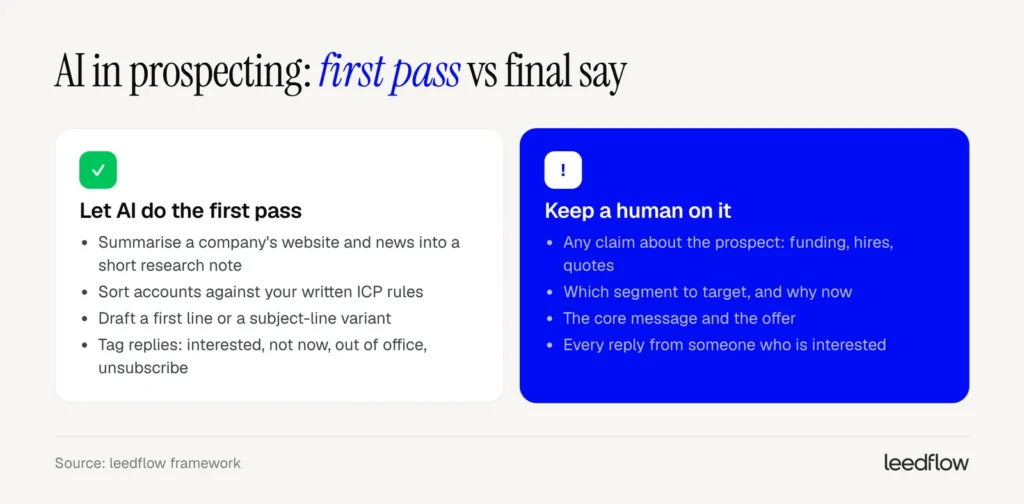
Our rule: AI drafts, and a person approves anything that makes a claim about the prospect. A made-up “just raised a Series B” is useless in a research note and embarrassing in an email.
Will AI take over prospecting? It can’t know which of your customers are the most profitable, or why the last three deals stalled. You can.
Where should a small sales team start?
Eight. That’s how many standalone tools the average sales team juggles when it doesn’t run on one platform. And 42% of reps feel overwhelmed by too many tools (Salesforce, 2026).
A small team can automate prospecting with a handful of tools, added in this order:
- Lists and verification, from a B2B database that verifies contacts. Most of the hours go here, and bad data breaks every later step.
- Exclusions. Cheap to set up, and they prevent the costliest mistakes.
- Follow-ups, from a sequence tool that sends on time and stops when someone replies.
- CRM logging. It’s the first thing reps skip once volume grows.
- AI personalisation and scoring. They only work on clean data and a clear ICP.
What we’d skip in month one: custom lead scoring, intent-data subscriptions and anything that needs a developer.
Start with one segment, one sequence and a few hundred contacts. Add the next segment once that works.
Step 1: Define your target customers
Ask a sales team who the ideal customer is. You’ll hear “mid-sized tech companies” or “anyone with a sales team”. Neither fits into a filter.
Automation needs an ICP (ideal customer profile) written as filters:
- Country or region, such as the Nordics.
- Industry, by code where you can (NACE in the EU, SNI in Sweden). Codes match across databases better than keywords.
- Company size: a headcount band, plus revenue if it affects your price.
- Signals: hiring for sales roles, a new head of sales, recent funding.
Pick the segment from your last 20–30 won deals. Look for what they share: industry, size, country, and what was happening when they bought.
An ICP written as filters
Logistics and transport companies in Sweden and Norway, 50–500 employees, that posted a sales job in the last 90 days. Exclude customers, open deals and companies in groups you already sell to.
Save it as a search that refreshes, so new matches show up on their own.
Most ICPs are too wide. If yours returns tens of thousands of companies for a two-person team, narrow it until you could work the list in a quarter.
Step 2: Find and qualify relevant companies
A filter returns 1,200 companies. Which 100 do you contact first?
Write the rules first, in two groups:
- Must-haves remove companies: wrong country, too small, already a customer.
- Signals rank the rest: hiring salespeople, a new leader, a move into a new market.
| Tier | Rule | Next step |
|---|---|---|
| A | All must-haves + 2 or more signals | You review them; most personal outreach |
| B | All must-haves + 1 signal | Standard sequence |
| C | Must-haves only | Wait for a signal |
For fuzzy criteria, let AI read a company’s website and answer one narrow question, such as “Do they have a field sales team?”, with yes, no or unknown. “Is this a good fit?” is too vague to check.
If 3 of the first 20 A-tier accounts look wrong, fix the rule. Fixing rows by hand means fixing them again next week.
Step 3: Find decision-makers and verify contact details
The company is right. The person is wrong. Your email lands with the office manager and goes nowhere.
For each A- and B-tier account, map 2–3 roles:
- the decision-maker who owns the budget (head of sales, or the CEO in a small company),
- a champion who feels the problem daily, such as a sales manager,
- sometimes an influencer in RevOps or marketing.
Search local titles too: “försäljningschef”, “säljchef” and “VD” in Sweden, “salgssjef” and “daglig leder” in Norway.
Then verify every email and phone number before it enters a sequence. Never send to guessed addresses. Firstname.lastname@ is right often enough to tempt you and wrong often enough to hurt, because bounces tell mailbox providers your list is old.
Catch-all domains accept every address, so verification can’t confirm them. Send to those in a small, separate batch, or start on LinkedIn.
This is the step where a B2B lead generation platform earns its cost. leedflow verifies contacts in real time (99% data accuracy) across 400M+ contacts, and the mobile phone finder is included on every plan, so you have a number when a call makes more sense than an email.
Data quality differs by country, so test any data provider on a sample of your own target accounts first.
Step 4: Exclude customers, duplicates and opt-outs
Your biggest customer’s CEO gets a cold email offering to “help them get started”. Nobody meant to. The list just never checked the CRM.
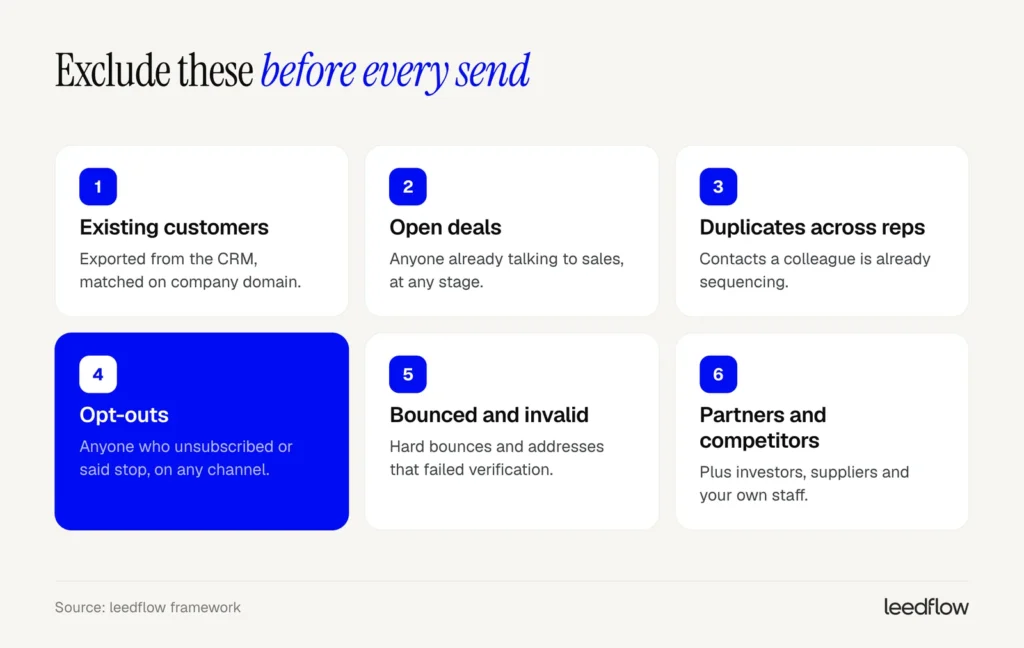
Build six exclusion lists and run all of them before every send. People unsubscribe and sign contracts mid-sequence, so a check at import isn’t enough.
What we do:
- One master suppression list, synced daily from the CRM, that every rep and tool reads.
- Match on email and company domain. Names get spelled five ways. Domains don’t.
- Opt-outs apply everywhere. An email unsubscribe also stops the LinkedIn steps and calls, for every rep.
- Process opt-outs within 48 hours, as Google’s sender guidelines FAQ recommends. An unsubscribe link does it instantly.
- Read the replies. “Please remove me” is an opt-out, click or no click.
- Set a cool-down for duplicates. If a colleague is sequencing a contact, nobody else adds them, and we’d wait 90 days before anyone tries the same person again.
In the EU, once someone objects to direct marketing, GDPR Article 21(3) says their data can no longer be processed for that purpose.
leedflow handles two of these lists for you: a blocklist so you never contact existing customers, and automatic duplicate prevention across team members.
Step 5: Prepare relevant outreach and follow-ups
An AI tool can write 500 “personalised” emails in the time it takes you to write one. Most will sound like they came from the same machine, because they did.
So split the work. You write the core message per segment: the problem you solve, why it matters to this role, and one clear ask. The tool handles the rest:
- adds an AI-drafted first line you approve or delete,
- schedules follow-ups and stops them, on every channel, when someone replies,
- tags replies so the interested ones reach you first.
For the cadence, plan several touches over two to three weeks, each with a new angle. Multichannel sequence design covers the rest.
AI research prompt for the first line
You are researching [Company] ([website]) for a B2B sales email. Use only their website, news page and job ads.
- What does [Company] sell, and to whom? One sentence.
- Is there a recent event that matters for [your problem area], such as hiring for [role], a new office or a new leader?
- Give the source URL for every fact. If you can’t find something, write “unknown”. Don’t guess.
The last two lines do most of the work: they give the AI a way to say it doesn’t know. “Unknown” is useful. A confident, made-up note is how you end up congratulating someone on a funding round that never happened.
Interested replies stay with you. What you offer next decides how many replies turn into meetings.
Step 6: Keep your CRM updated
46% of sales pros using AI agents say data quality issues hurt their sales. Manual errors and duplicate data top their list of problems (Salesforce, 2026).
Sync these automatically, or hundreds of new contacts a week end up in a spreadsheet nobody trusts:
- New contacts and companies, matched on email and domain to avoid duplicates.
- Every touch, with its date.
- Replies and their tag: interested, not now, unsubscribe.
- Opt-outs and bounces, back into the master suppression list.
- A task for the owner when someone replies with interest.
Re-verify older records before you reuse them. People change jobs.
The human part is a 15-minute review each week: tasks nobody picked up, “not now” replies that need a date to come back (the date they gave you, or about 90 days out), and any jump in bounces.
A complete prospecting workflow in practice
Picture a two-person team in Stockholm, a founder and one SDR, selling planning software to logistics firms in Sweden and Norway. This week is an example we built for this post.
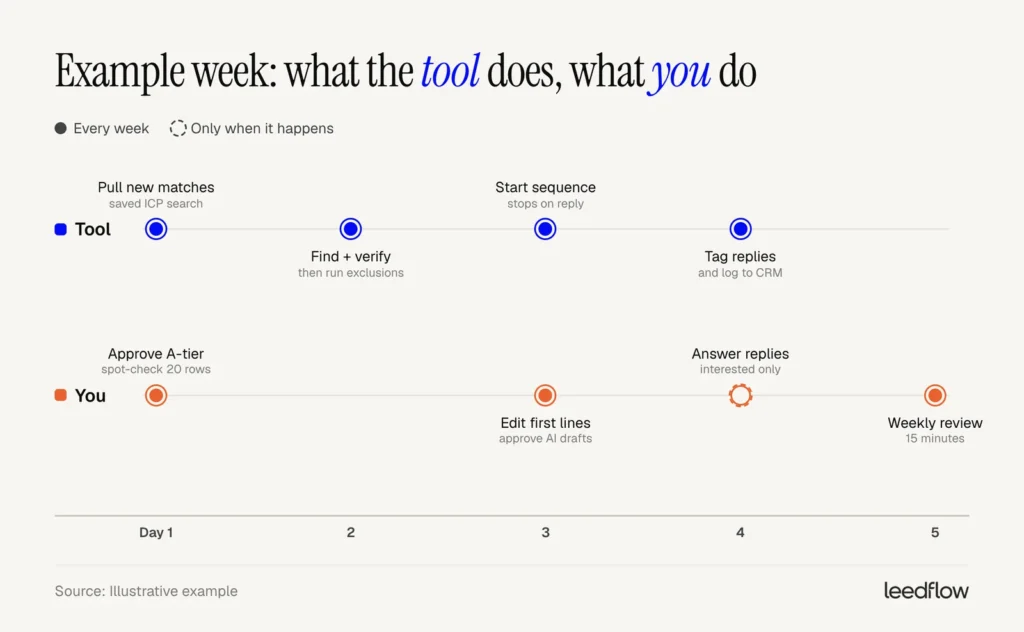
| Day | You do | Time |
|---|---|---|
| Monday | Spot-check 20 new A-tier rows, fix any rule that’s off | 30 min |
| Tuesday | Nothing, unless verification flags a problem | 0–10 min |
| Wednesday | Edit or delete the AI first lines, approve the batch | 45 min |
| Every day | Answer interested replies | 20–40 min |
| Friday | Review open tasks, “not now” dates and rules | 15 min |
In between, the tool refreshes the search, verifies contacts, runs the exclusions, sends follow-ups and logs everything.
The time boxes are suggestions. Added up, that’s 3 to 5 hours of human work a week, more in the first two weeks while you tune the rules. The rest of the week goes to calls and meetings.
What does automated prospecting cost, and how much time does it save?
18% plus 13%. That’s the share of a rep’s week that goes to prospecting and manual data entry, and it’s the time automation can reach.
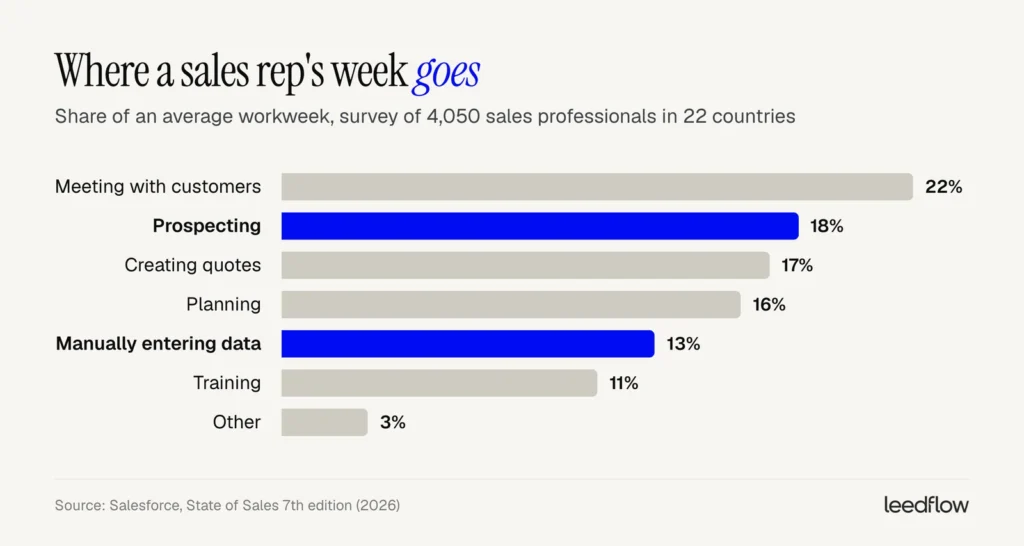
One caveat. Salesforce sells AI and CRM software, and the survey is self-reported. Your own calendar is a better source.
What it costs
- Data: per contact or in monthly credits. Ask what one credit buys.
- Outreach: per user or sending inbox.
- CRM: per user, and you likely have one.
- Setup: a few days for the ICP, rules and first messages.
Fewer tools means fewer seats and fewer places for data to go stale. That’s the main case for one platform that combines data and outreach (leedflow pricing).
How much time it saves
Hours saved per month = weekly hours × share spent on prospecting and data entry × share you automate × 4.33
| Input | Example | Source |
|---|---|---|
| Hours per week | 40 | Assumption: full-time |
| Prospecting + data entry | 31% (18% + 13%) | Salesforce (2026) |
| Share you automate | 33% | Assumption, near the 34% research-time cut sellers expect |
| Weeks per month | 4.33 | 52 ÷ 12 |
| Hours saved per rep per month | about 18 | 40 × 0.31 × 0.33 × 4.33 = 17.7 |
| Hourly labour cost | €34.9 | Eurostat, EU average 2025 |
| Value per rep per month | about €620 | 17.7 × €34.9 |
Eurostat’s figure is the whole-economy average. Many sales roles cost more, so treat it as a floor.
Then flip it: break-even hours = monthly tool cost ÷ hourly cost. A €500-a-month stack (an example; use your real quotes) needs to save about 14 hours a month at €34.9 an hour.
Two things the formula doesn’t show:
- Saved hours only count if they go to conversations. If they fill up with admin, nothing changed.
- Coverage is often the bigger win. Nearly half of reps (47% in the report) say their team lacks the bandwidth for cold outreach. Automation reaches the accounts you never got to.
Automate prospecting with verified data and built-in exclusions
leedflow finds verified decision-makers among 400M+ contacts, blocks existing customers and duplicates across your team, and runs automated email and LinkedIn sequences in one place. Launch outreach in minutes, not days.